Every site list on FapIndex now has a thin line of text above it with a Sort menu and a Filters button. You'll find it on the category pages, on Top 50, on the VR, AI and cam shelves, and on the lists of new and recently updated reviews. Pick a sort or click a couple of chips and the list you're already reading reshapes itself on the spot.
Why we built it
Until this week every list had exactly one order, our score. That's fine if you want the strongest site in a niche and stop there. It's much less fine when you want something narrower, like an 8K VR site you can pay for with PayPal, or the MILF sites we reviewed most recently. The only way to find those was to scroll the whole ranking and read every card, and on the biggest category pages that's over a thousand sites.
In August we shipped search with a filter panel. That one lives on its own results page and starts from the whole catalog. The new bar starts from the page you're on. Land on the MILF ranking and the filters work on its 79 sites and nothing else.
How the bar works

Sort has seven options: top rated (the default), newest reviews, recently updated, most new scenes in the last 30 days, most videos, cheapest per month, and A to Z. The ones built on catalog numbers (fresh scenes, videos, price, last update) only appear when at least two sites on the page have that number. Sites with no figure sink to the bottom in either direction, because a site with no price on record shouldn't pass for the cheapest one.
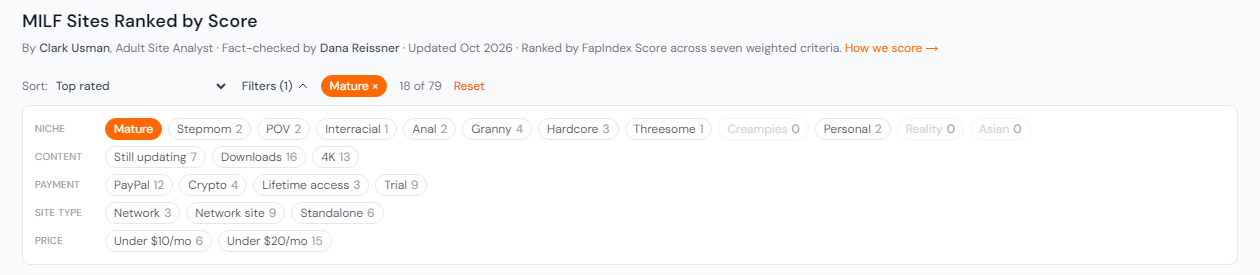
Filters open on click and come in five groups:
- Niche: the 12 categories the sites on that page share most, leaving out the page's own category.
- Content: still updating, downloads, 4K, 8K.
- Payment: PayPal, crypto, lifetime access, trial.
- Site type: a whole network, a single site inside a network, or a standalone site.
- Price: under $10 or under $20 a month.
Each chip shows how many sites would be left if you clicked it right now. If a chip would keep every site on the unfiltered page, or fewer than two, we don't show it, since it can't narrow anything in a useful way. Once you start filtering, a chip that would leave nothing turns grey and stops responding. Niche, content and payment chips stack, so 8K plus PayPal means sites that have both. Site type and price take one choice at a time: clicking "under $10" swaps out "under $20" if that one was on. Whatever is on stays on the bar as a pill you can click away, next to a running count and a Reset link.
A few real numbers
On the VR shelf, 8K keeps 44 of the 65 sites, and adding PayPal brings that to 37. On the MILF ranking, Mature leaves 18 of 79. With Mature on, PayPal would keep 12 of those and under $20 a month would keep 15.
Whatever you pick is written into the address, so a filtered view can be shared or bookmarked. These two links open already filtered: 8K VR sites that take PayPal and MILF sites tagged Mature.
Category pages and shelves work differently
The chips mean the same thing everywhere. What happens behind them depends on the size of the list. The 146 category hubs listed on our category index go up to about 1,250 sites each, which is a lot to ship to your browser and shuffle there. So on those pages the filtering runs on our server and results come back 30 at a time, with a Show more button under them. Once a filter or sort is on, the three big feature cards at the top step aside for a flat list, and every row keeps its real rank in the category. A site ranked 14th still says 14th, even when it's first in your filtered view.
The grid shelves are smaller and every card is already on the page: Top 50, VR, AI, cams, new reviews and recently updated. There the bar just reorders and hides the cards you already have. The old "By Rating / A to Z" toggle on category lists is gone, since the Sort menu covers it.
The version of each page that loads first, which is also what search engines read, is the same list as before. Filtered addresses point search engines back to the plain page, so they don't compete with it.
Where it's thin
The VR niche chips are close to useless for now. VR sites carry almost no niche categories in our data, so each niche chip on the VR shelf matches two sites. On that shelf the content and payment chips do the real work. The filters also only know what our reviews record. A site with no resolution on file and no 4K tag won't match the 4K chip, whatever it streams in, so a site you expected can drop out of a filtered list for that reason alone.